New animation IDs.
Less manual work.
Queue exported clips, collect approved IDs, and preview replacements in your open Studio place—with native Undo.
One-time purchase · Source ZIP · Primarily Traditional Chinese UI
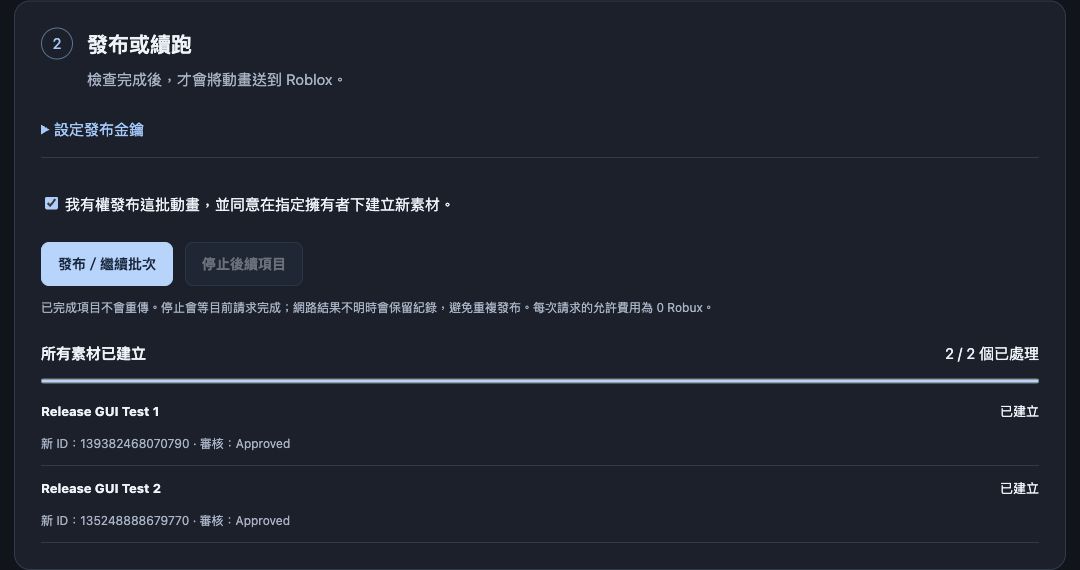
Real publishing results. Separate Studio checks verified joint movement for both clips and restored two ID changes with one Undo.
From clips to updated IDs.
Keep the export step in Studio. Handle the publishing queue and mapping in a local browser app.
Select your clips
Select KeyframeSequence animations in Studio. Save each native export through its own dialog and confirm it.
Queue exported files
Process files sequentially with the official Open Cloud Assets API. Resume the queue when needed.
Collect approved IDs
Create an old-to-new ID mapping from approved results. Roblox moderation still applies.
Preview, apply, undo
Replace AnimationId properties on Animation instances in the currently open place. Restore with native Studio Undo.
Know what has been tested.
A focused macOS workflow for animations you own or have permission to publish.
You will need
- macOS, Python 3.9 or newer, and Roblox Studio.
- Your own Roblox account and official API key with Assets Read and Write permissions.
- Native animation exports and permission to publish the source animations.
- Comfort running a source ZIP and configuring a local app. This is not a signed or notarized desktop app.
macOS · Python 3.9.6 · Roblox Studio 0.741.19.7411056 · Personal creator · KeyframeSequence.
Two native exports became Approved assets, both played with joint movement, and one Undo restored two AnimationId replacements.
Group publishing, CurveAnimation, R15, Windows, Linux, and large live batches have not been verified.
A clear scope.
A repeatable workflow.
Includes the local publishing app, Studio plugin, and setup guide. Browser app and buyer guide are primarily Traditional Chinese; the Studio plugin is English.
Does it export everything unattended?
No. Each animation needs its own native Studio save dialog and explicit confirmation. Batch publishing begins after the exported files are queued.
What gets replaced?
AnimationId properties on Animation instances in the currently open Studio place. Script literals, runtime-generated IDs, and other places are outside this replacement workflow.
Can it transfer animations I do not own?
Only publish animations you own or are authorized to publish. The tool uses official APIs and does not bypass ownership, permissions, or moderation.
Is this a Roblox product?
No. Animation Batch Publisher is independent and is not affiliated with or endorsed by Roblox.
Ready for your next batch.
Read the requirements above before purchasing.